
Ugh, that sinking feeling when you realize you’ve just deleted something priceless from your phone. We’ve all been there. The good news? You can often get those photos and videos back. I’ve put together this no-nonsense guide with the methods that actually work for getting your memories off life support.
Table of Contents
How to Recover Deleted Photos for Android
Android phones often have a few safety nets you might not know about. Let’s check those first.
1. Raid the Google Photos Trash
If you had Google Photos backing things up, you’re probably in luck.
- Open the app.
- Tap on “Library” at the bottom.
- Go to “Trash”.
- In there, you’ll find everything you’ve binned in the last 60 days.
- Just tap the photo and hit “Restore” to bring it back home.
2. Don’t Forget Your Gallery’s “Recently Deleted” Folder
This one catches a lot of people out. Brands like Samsung and Xiaomi have their own secret trash folder tucked inside the Gallery app.
- Open your Gallery app.
- Look for an album named “Recently Deleted” or “Trash.”
- You might just find your missing files there, safe and sound for about a month.
3. When All Else Fails, Try a Recovery App
If the trash folders came up empty, it’s time to bring in the specialists.
- For a simple option that’s great for pictures, DiskDigger is a solid pick.
- If you need to pull back videos and other files too, something more powerful like Dr.Fone – Data Recovery is the way to go.
Golden Rule: The instant you know something’s gone, stop using your phone. Every new picture you take or app you download makes it less likely you’ll get your old stuff back.
How to Recover Photos Deleted from iPhone
iPhones are pretty good at giving you a second chance. Here’s where to look.
1. Your First Stop: The “Recently Deleted” Album
This is Apple’s gift to the clumsy:
- Open your Photos app.
- Head to the “Albums” tab.
- Scroll down until you see “Recently Deleted.”
- Anything you’ve deleted in the last 30 days will be hanging out here.
- A quick tap on “Recover” and it’s back where it belongs.
2. Roll Back with an iCloud Backup
Couldn’t find it in the Recently Deleted folder? Don’t sweat it yet. If you back up to iCloud, an older version of your phone might have it.
- Go to Settings > [your name] > iCloud > Manage Storage > Backups.
- See a backup from before the great deletion?
- You can restore your entire phone to that point.
⚠️ Heads up: This is a nuclear option. It will wipe your phone completely and replace everything with that old backup, so you’ll lose anything new since then.
3. Use Specialized iPhone Recovery Tool
If a full restore sounds too extreme, some software can dig deeper.
Programs like:
- Tenorshare UltData
- Dr.Fone iOS Recovery
These are like digital archaeologists. They can scan your phone or your backup files directly to find traces of photos and videos that the standard phone menus can’t see anymore.
How to Recover Photos from Google Photos
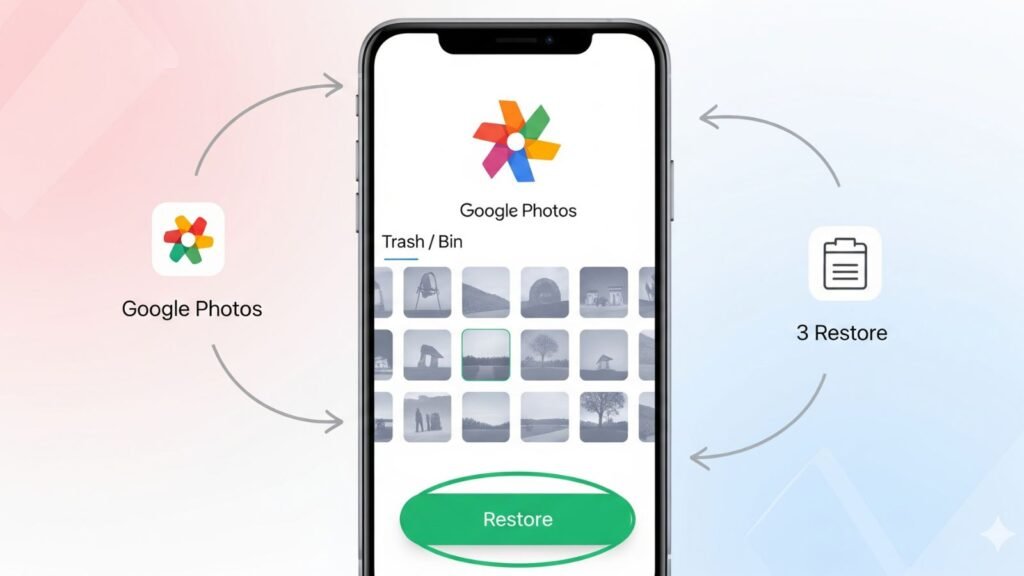
Even if your phone’s trash is empty, your Google account might still have the goods.
- Open the Google Photos app or website on your computer.
- Find the “Trash” section (sometimes called Bin).
- If your photos are in there, just select them and hit “Restore.”
⚠️ Note: Google only hangs onto deleted items for 60 days before clearing them out for good.
How to Recover Photos from iCloud
Your iCloud is more than just storage; it’s a history book for your phone.
- First, log into iCloud.com on a computer and check the Photos app.
- There’s a “Recently Deleted” folder in there too — make sure to check it!
- If they’re not there, your last resort is that full iCloud backup we talked about in the iPhone section.
How to Recover Photos from SD Card

Memory cards are a bit different. Your best shot is to use a computer.
- Carefully take the SD card out of your phone and plug it into your computer (you’ll probably need a card reader).
- Fire up a recovery program.
- Free option: Recuva.
- Paid, deeper scans: EaseUS Data Recovery Wizard or Stellar Photo Recovery.
- Let the software run a deep scan.
- When you recover the files, always save them directly to your computer’s hard drive.
- Never save them back to the same SD card — you could overwrite the very files you’re trying to save.
A Quick List of Recovery Apps That Work
- DiskDigger (Android): Simple and effective, especially for photos.
- Recuva (Windows): A fantastic free option for memory cards and computers.
- Dr.Fone (Android & iPhone): A bit pricier, but it gets the job done when others fail.
- EaseUS Data Recovery: A reliable all-rounder for deep scans.
⚠️ Pro Tip: Always download from official websites to avoid malware.
Do This Right Now to Improve Your Chances
- Stop what you’re doing. Seriously.
- Check every trash folder you can think of — Google Photos, iCloud, Gallery, etc.
- For SD cards, a computer + good software is your strongest weapon.
- Always recover files to a different device. Never save them back to the original spot.
How to Avoid This Heartache in the Future
The best fix is not needing recovery at all.
- Turn on automatic backups!
- For Android, set up Google Photos.
- For iPhone, make sure iCloud Photos is on.
It’s a few bucks a month for peace of mind — totally worth it.
Quick Questions, Straight Answers (FAQs)
Q: Can I really get permanently deleted photos back?
A: Sometimes, yes. But it’s a race against time. The more you use the phone after deleting, the lower your chances become.
Q: Are these apps free?
A: Most let you scan for free to see if your files are recoverable.
Actually getting them back usually requires buying the full version.
Q: Is it harder to get videos back than photos?
A: It can be, because video files are larger, but the same tools and methods apply.
Read From Official Website: Google Support
Also Read Our Other Article: How to Secure Whatsapp , GST Revolution


Sup folks! jljl533 looks legit enough. Have a gander at jljl533